This Shopify Monthly Fees Guide Helps You Choose the Right Subscription Plan
This post may contain affiliate links. Please read ourdisclosure policy
Launching an online store involves more than choosing products to sell. One of the first decisions you'll make is selecting a subscription plan that fits your budget and business goals. Understanding Shopify monthly fees helps you estimate startup costs, compare available plans, and avoid unexpected expenses as your store grows.
Shopify offers several pricing tiers designed for different business sizes, from new entrepreneurs to established brands processing thousands of orders every month. Each plan includes website hosting, security, ecommerce tools, and customer support, but the features and transaction costs vary.
Shopify Monthly Fees: Current Pricing Plans
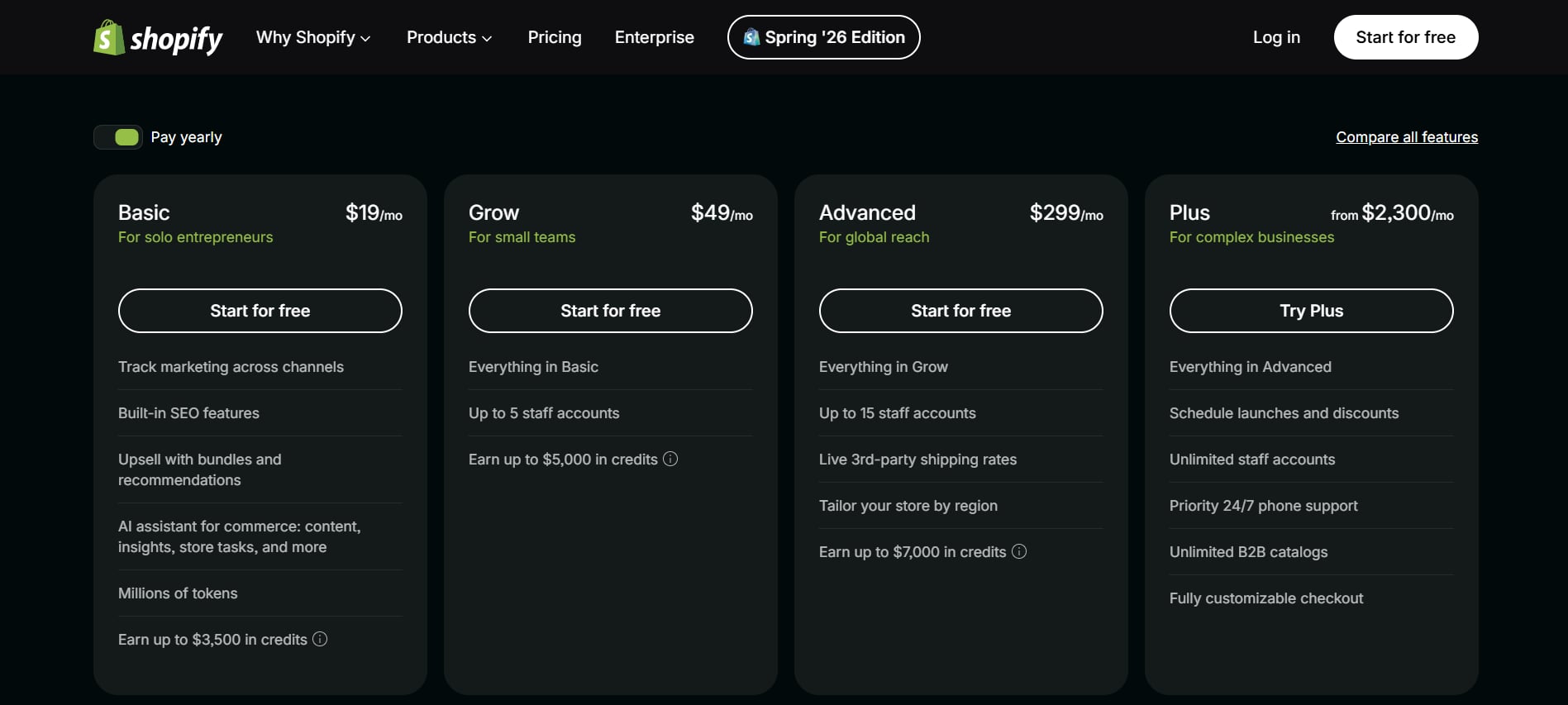
Shopify offers three primary subscription plans for most merchants.
Basic Shopify
- Monthly fee: $39/month
- Best for new businesses and startups
- Online store and blog
- Unlimited product listings
- Abandoned cart recovery
- Shopify POS Lite
- 24/7 customer support
- Basic reports
This plan provides everything needed to launch an online store without paying for advanced business features.
Grow Shopify
- Monthly fee: $105/month
- Best for growing ecommerce businesses
- Lower payment processing fees
- Professional reports
- Additional staff accounts
- Better shipping discounts
- Enhanced analytics
Businesses with increasing sales often save enough through lower transaction costs to offset the higher subscription price.
Advanced Shopify
- Monthly fee: $399/month
- Best for large businesses
- Advanced reporting
- Custom report builder
- Greater shipping discounts
- More staff accounts
- Third-party calculated shipping rates
- Lower payment processing fees
Advanced Shopify is designed for stores processing a high volume of monthly sales.
Shopify Monthly Fees Comparison
Basic
- Monthly Price: $39/month
- Best For: New businesses
Grow
- Monthly Price: $105/month
- Best For: Growing stores
Advanced
- Monthly Price: $399/month
- Best For: Large businesses
What Is Included With Shopify Monthly Fees?
Every Shopify subscription includes several essential ecommerce features.
Secure Website Hosting
You don't need to purchase separate web hosting. Shopify hosts your online store with fast, reliable servers.
SSL Certificate
Every Shopify store receives a free SSL certificate that encrypts customer information and improves website security.
Unlimited Products
All plans allow unlimited product listings, making it easy to expand your inventory.
Mobile-Friendly Store
Payment Processing
Shopify Payments allows you to accept:
- Visa
- Mastercard
- American Express
- Discover
- Apple Pay
- Google Pay
- Shop Pay
You can also connect third-party payment providers if preferred.
Marketing Tools
Shopify includes:
- Discount codes
- Gift cards (on eligible plans)
- Email marketing tools
- SEO settings
- Social media integration
24/7 Customer Support
Support is available through chat and the Help Center whenever you need assistance.
Additional Costs Beyond Shopify Monthly Fees
While the subscription covers many essentials, there are optional expenses to consider.
Custom Domain
- Around $15–$22 per year when purchased through Shopify
- Prices vary depending on the domain extension
A custom domain helps establish a professional brand.
Premium Themes
Although free themes are available, premium themes typically cost:
- $100–$500 (one-time purchase)
Premium themes often include more customization options and advanced layouts.
Shopify Apps
Many businesses install apps for additional functionality. Examples include:
- Email marketing
- Reviews
- Loyalty programs
- Inventory management
- Upselling
- SEO optimization
Typical app pricing:
- Free
- $5–$50/month
- Premium enterprise apps can exceed $100/month
Transaction Fees
If you don't use Shopify Payments, Shopify charges additional transaction fees depending on your plan. Using Shopify Payments eliminates these extra Shopify transaction fees, though standard card processing fees still apply.
Email Hosting
Professional email addresses are optional. Typical pricing:
- $6–$12/month depending on your email provider
How Shopify Monthly Fees Compare to Building Your Own Ecommerce Website
Building a standalone ecommerce website often requires paying separately for multiple services.
Typical costs include:
- Web hosting
- SSL certificate
- Website builder
- Security updates
- Technical maintenance
- Ecommerce software
- Customer support
Shopify combines these into a single monthly subscription, making budgeting much simpler.
Which Shopify Plan Offers the Best Value?
Basic Shopify
Choose this plan if you:
- Are launching your first online store
- Sell a smaller product catalog
- Have a limited budget
- Need essential ecommerce tools
Grow Shopify
This plan works well if you:
- Process consistent monthly orders
- Need better analytics
- Want lower payment processing fees
- Have multiple employees managing the business
Advanced Shopify
Advanced Shopify is ideal if you:
- Generate significant monthly revenue
- Need custom reports
- Require advanced shipping options
- Manage a large ecommerce operation
Tips for Saving Money on Shopify Monthly Fees
Start With the Right Plan
Many new businesses succeed with Basic Shopify before upgrading.
Use Shopify Payments
Avoid additional Shopify transaction fees by using Shopify Payments when available.
Choose Free Themes First
Shopify offers professionally designed free themes that work well for most stores.
Install Apps Carefully
Only add apps that provide real value. Too many subscriptions can increase monthly expenses quickly.
Pay Annually
Shopify often offers lower effective monthly pricing when you choose annual billing instead of paying month-to-month.
Common Questions About Shopify Monthly Fees
Is Shopify worth the monthly fee?
For many businesses, yes. The platform includes hosting, security, ecommerce tools, payment processing, and customer support in one subscription.
Can you change plans later?
Yes. Shopify allows you to upgrade or downgrade your plan as your business grows or your needs change.
Are there hidden fees?
There are no hidden subscription charges, but optional costs such as premium themes, apps, custom domains, and third-party payment transaction fees can increase your overall expenses.
Do all plans include unlimited products?
Yes. Every standard Shopify plan supports unlimited product listings.
Is there a free trial?
Shopify frequently offers free trials or introductory promotional pricing for new users. Availability may vary over time.
Start Your Online Store With the Right Shopify Plan
Choosing the right Shopify monthly fees plan depends on your budget, sales volume, and long-term business goals. Basic Shopify is an excellent starting point for new entrepreneurs, while Grow and Advanced plans provide additional reporting, lower payment processing costs, and tools designed for expanding businesses.
Before selecting a subscription, estimate your expected monthly sales, determine which features you'll actually use, and factor in optional expenses such as domains, themes, and apps. Taking time to compare the available plans helps you invest in a solution that supports your business today while leaving room for future growth.