What Shopify Analytics Can Do to Improve Ecommerce Business Performance Today
This post may contain affiliate links. Please read ourdisclosure policy
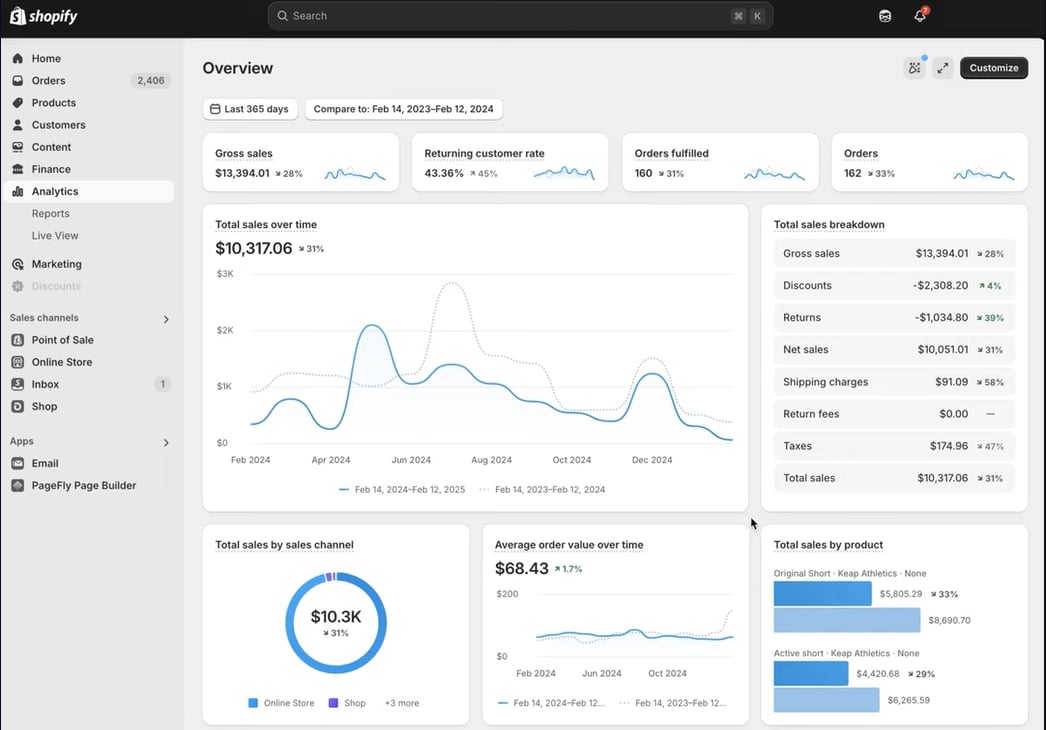
If you want to grow an online store successfully, data should guide every decision. Shopify Analytics gives you access to valuable reports that reveal how your business is performing, what customers are buying, where visitors come from, and which marketing campaigns generate the most revenue.
Instead of relying on guesswork, you can use real-time information to improve sales, increase conversions, and optimize your overall ecommerce strategy. The best part is that Shopify Analytics is included with every Shopify subscription, making it accessible to businesses of every size. As your store grows, more advanced reporting features become available, helping you make increasingly informed decisions.
Shopify Analytics Pricing and Plans
One of the biggest advantages of Shopify Analytics is that there's no separate subscription fee. Analytics is built directly into every Shopify plan.
Shopify Plan Pricing
- Basic Shopify: $39/month
- Analytics value: approximately $20–$50/month
- Shopify (Grow): $105/month
- Analytics value: approximately $50–$150/month
- Advanced Shopify: $399/month
- Analytics value: approximately $150–$400/month
- Shopify Plus: Starting at $2,000–$2,500+/month
- Enterprise analytics value: $500–$2,000+/month
Since reporting tools are bundled into your subscription, you don't need to purchase additional software to monitor your store's daily performance.
Optional Analytics Expenses
Businesses requiring deeper reporting may add third-party solutions. Typical costs include:
- Analytics apps: $49–$399/month
- Business Intelligence (BI) software: $10–$150/month per user
- Data connectors: $20–$300/month
These tools are commonly used by larger stores with advanced reporting requirements.
Shopify Analytics Dashboard Overview
The Shopify Analytics dashboard serves as your ecommerce command center. It provides an instant snapshot of your store's health without requiring technical knowledge.
At a glance, you can monitor:
- Total sales
- Online store sessions
- Conversion rate
- Average Order Value (AOV)
- Returning customer rate
- Sales trends
- Order volume
The dashboard updates frequently, allowing you to identify performance changes quickly.
Sales Reports That Drive Better Decisions
Sales reports help explain exactly where revenue originates.
You can analyze:
- Sales by product
- Sales by collection
- Sales by sales channel
- Sales by location
- Discount performance
- Taxes collected
- Gross versus net sales
These reports make it easier to identify bestselling products, eliminate poor performers, and improve pricing strategies. For example, if one product consistently produces high revenue but low profit margins, you can adjust pricing or supplier costs before profitability declines.
Customer Analytics and Purchasing Behavior
Understanding customers is one of the greatest strengths of Shopify Analytics.
Customer reports provide insights into:
- Customer Lifetime Value (CLV)
- Repeat purchase rate
- New versus returning customers
- Customer segments
- Average customer spend
- Purchase frequency
These metrics help you build stronger retention strategies instead of focusing only on acquiring new customers. You can identify loyal buyers, reward repeat customers, and personalize email marketing campaigns based on shopping habits.
Product Analytics for Inventory Optimization
Product reports reveal how individual products perform over time.
Useful metrics include:
- Product conversion rates
- Inventory turnover
- Sales by SKU
- Product demand
- Units sold
- Product profitability
These insights help prevent overstocking and reduce inventory shortages. Instead of guessing what products deserve larger inventory investments, you can rely on actual purchasing data.
Marketing Analytics and Traffic Sources
Marketing reports show where visitors originate and which campaigns generate sales.
Supported traffic sources include:
- Organic search
- Paid advertising
- Email marketing
- Social media
- Direct traffic
- Referral websites
Shopify Analytics also measures campaign effectiveness by tracking conversions from each marketing channel. This helps you shift advertising budgets toward campaigns producing the highest return on investment.
Behavior Reports Reveal Customer Activity
Behavior reports explain what visitors do before making a purchase—or leaving your website.
Important behavioral metrics include:
- Bounce rate
- Session duration
- Pages viewed
- Device type
- Landing pages
- Exit pages
- Navigation paths
These reports identify friction points within your customer journey. For instance, if many visitors leave during checkout, you can investigate shipping costs, payment options, or checkout usability.
Shopify Live View for Real-Time Monitoring
One unique feature is Live View. Live View displays your store's activity as it happens.
You can monitor:
- Active visitors
- Live orders
- Geographic visitor locations
- Sales occurring in real time
- Current customer activity
This feature becomes especially valuable during:
- Holiday sales
- Product launches
- Flash promotions
- Black Friday events
- Marketing campaigns
Real-time visibility helps you respond immediately to changing customer behavior.
Advanced Reporting Features
Higher-tier Shopify plans unlock more powerful reporting capabilities.
Advanced features include:
- Custom report builder
- Report filtering
- Customer segmentation
- Scheduled reports
- CSV exports
- Advanced financial reports
These tools allow businesses to create reports tailored to specific operational needs. Instead of relying solely on standard dashboards, you can build reports around inventory, marketing performance, profitability, or customer behavior.
Integrations Expand Shopify Analytics
Shopify Analytics becomes even more valuable when connected to external platforms.
Popular integrations include:
- Google Analytics 4
- Meta Pixel
- TikTok Pixel
- Google Ads
- Shopify Flow
- External BI platforms
- Shopify APIs
These integrations combine marketing, advertising, and sales data into a broader view of business performance. Developers can also use Shopify APIs to export data into custom dashboards or enterprise reporting systems.
Technical Infrastructure
Shopify Analytics operates on Shopify's cloud-based SaaS infrastructure.
Key technical advantages include:
- Cloud-based reporting
- Real-time and near-real-time processing
- Automatic updates
- Secure data storage
- CSV exports
- API accessibility
- Scalable architecture
This infrastructure handles growing data volumes without requiring merchants to maintain servers or databases. Even stores processing thousands of daily orders can rely on consistent reporting performance.
Strengths of Shopify Analytics
Shopify Analytics offers several significant advantages.
Major strengths include:
- Included with every Shopify plan
- Easy-to-understand dashboard
- Fast implementation
- Real-time reporting
- Native Shopify integration
- Excellent ecommerce metrics
- Strong customer insights
- Reliable sales reporting
- Minimal learning curve
Because everything works inside Shopify, you avoid switching between multiple reporting platforms for everyday business decisions.
Limitations to Consider
Although Shopify Analytics covers essential ecommerce reporting, it has some limitations.
These include:
- Limited advanced reporting on lower-tier plans
- Basic attribution modeling
- Fewer customization options compared to enterprise BI software
- Complex multi-touch customer journey analysis requires external tools
- Some advanced segmentation is reserved for higher plans
Large enterprise organizations often supplement Shopify Analytics with dedicated Business Intelligence platforms for deeper analysis.
Who Should Use Shopify Analytics?
Shopify Analytics works well for a wide range of businesses.
It's ideal for:
- New ecommerce businesses
- Small online stores
- Growing Shopify merchants
- Direct-to-consumer brands
- Multi-product retailers
- Mid-sized ecommerce companies
Enterprise businesses also benefit from Shopify Analytics as a foundational reporting platform while combining it with specialized analytics solutions.
Is Shopify Analytics Worth Using?
Shopify Analytics provides one of the most accessible ecommerce reporting systems available today. Since it's included with every Shopify subscription, you gain valuable business insights without paying for separate analytics software.
From sales reports and customer behavior to marketing performance and inventory tracking, the platform delivers the information needed to make smarter business decisions. As your store grows, advanced reporting, custom dashboards, API integrations, and automation features expand its capabilities even further.
For most ecommerce businesses, Shopify Analytics offers an excellent balance of usability, performance, and value, making it an essential tool for measuring growth and improving long-term success.