How to Launch a Shopify Store Quickly With a Simple Setup Process
This post may contain affiliate links. Please read ourdisclosure policy

Setting up a Shopify store is a straightforward process that allows individuals and businesses to sell products online without advanced technical knowledge. Shopify provides built-in tools for design, payments, inventory, and order management, making it accessible for beginners.
This guide explains the essential steps involved in creating a Shopify store, along with key considerations at each stage.
What Is Shopify and How Does It Work?
Shopify is an eCommerce platform that enables users to create and manage online stores. It operates as a hosted solution, meaning users do not need to manage servers or install software. Instead, everything is handled through a web-based dashboard. Store owners can:
- Add and manage products
- Customize store design
- Accept payments securely
- Track orders and customer data
How to Create a Shopify Account
To begin, users must register for a Shopify account. This involves providing an email address, password, and store name.
Step 1: Create Your Shopify Account
The first step is to sign up for a Shopify account through the official website.
You will be asked to enter:
- Your email address
- A secure password
- Your store name
Once completed, Shopify automatically creates your store and assigns a default domain (e.g., yourstore.myshopify.com). You’ll then be directed to the admin dashboard.

Step 2: Familiarize Yourself With the Dashboard
The Shopify dashboard is your main control panel. From here, you can manage all aspects of your store.
Key sections include:
- Orders – Track and manage purchases
- Products – Add and edit items for sale
- Customers – View customer information
- Analytics – Monitor store performance
- Settings – Configure store details
Understanding where things are located will make the setup process smoother.
Step 3: Choose a Theme for Your Store
A theme determines how your store looks and how content is displayed.
To select a theme:
- Go to Online Store → Themes
- Browse free or paid options
- Preview themes before applying
Choose a layout that fits your product type and keeps navigation simple for visitors.
Step 4: Customize Your Store Design
After selecting a theme, you can adjust its appearance using Shopify’s built-in editor.
You can:
- Upload your logo
- Change colors and typography
- Edit homepage sections (banners, featured products, etc.)
This step ensures your store reflects your brand identity.

Step 5: Add Products to Your Store
Products are the core of your Shopify store. To add items:
- Go to Products → Add product
- Enter product title and description
- Upload images
- Set pricing and inventory
If your products come in different options (like sizes or colors), you can add variants within the same listing.

Step 6: Organize Products Into Collections
Collections group similar products together, making it easier for customers to browse your store.
You can create collections such as:
- Category-based groups
- Featured items
- Seasonal products
Collections can be set manually or automatically based on conditions.

Step 7: Set Up Payment Methods
To accept payments, you need to enable payment providers.
Go to Settings → Payments and choose from:
- Shopify Payments
- PayPal
- Other third-party gateways
Make sure your selected payment options are available in your region and properly configured.

Step 8: Configure Shipping Settings
Shipping settings determine how products are delivered and how much customers are charged.
To set this up:
- Go to Settings → Shipping and Delivery
- Define shipping zones
- Set shipping rates (free, flat, or calculated)
Clear shipping rules help prevent confusion during checkout.

Step 9: Set Up Taxes
Depending on your location, you may need to collect taxes on sales.
Shopify provides automated tax calculations, but you should:
- Review settings under Taxes and Duties
- Adjust rates if required
It’s important to ensure your store follows local tax regulations.

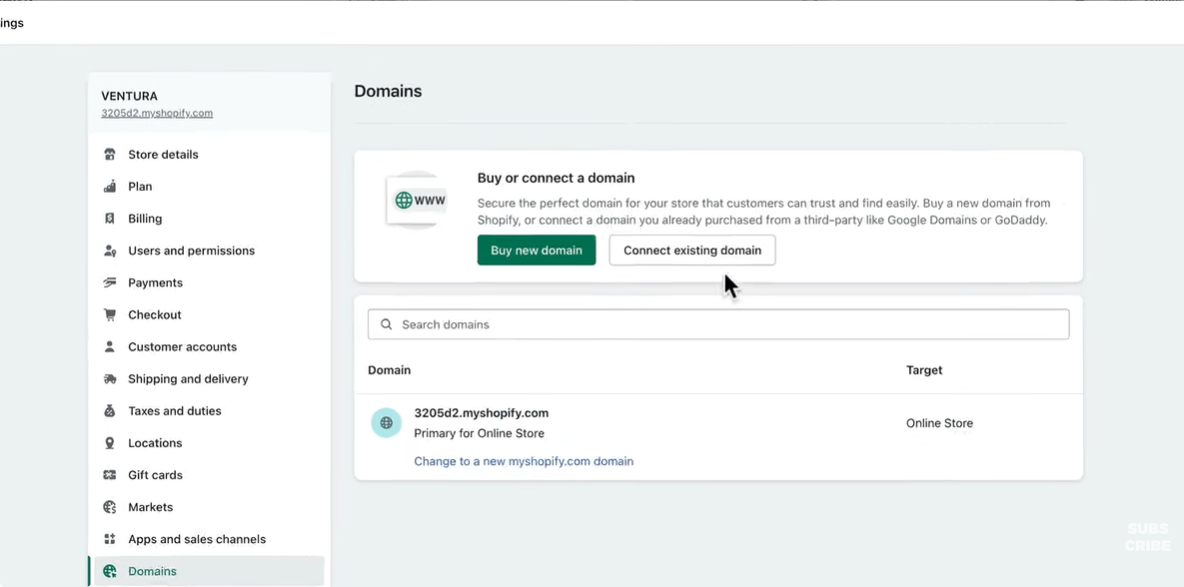
Step 10: Connect a Custom Domain
A custom domain makes your store appear more professional and easier to remember.
To connect one:
- Go to Settings → Domains
- Purchase a domain or link an existing one
This replaces the default Shopify URL with your branded web address.
Step 11: Create Essential Store Pages
Every Shopify store should include key pages that provide information and build trust.
Important pages include:
- About page
- Contact page
- Privacy policy
- Refund policy
- Terms and conditions
Shopify offers templates for policy pages that you can customize.

Step 12: Test Your Store Before Launch
Testing ensures everything works as expected before customers visit your store.
Check the following:
- Product listings and images
- Navigation and links
- Checkout process (use test mode)
- Mobile responsiveness
Fix any issues you find to avoid problems after launch.

Step 13: Launch Your Shopify Store
Once everything is ready, you can make your store live.
To launch:
- Go to Online Store → Preferences
- Disable the password protection
Your store will then be accessible to the public.
Final Notes
Setting up a Shopify store follows a clear sequence: account creation, design setup, product listing, payment configuration, and final testing. Completing each step ensures that the store functions properly and provides a smooth experience for customers.
Once the store is live, regular updates and monitoring are needed to maintain performance and support growth.